PetWalkly Sign up

Features

Everything professional pet care businesses need — scheduling through to back-office finance. Web for the office, mobile for staff in the field, a branded client portal, custom intake forms, WhatsApp and portal requests on one dashboard, GPS walk proof, and support when you switch systems.

Screenshots use fictional example data.

Scheduling

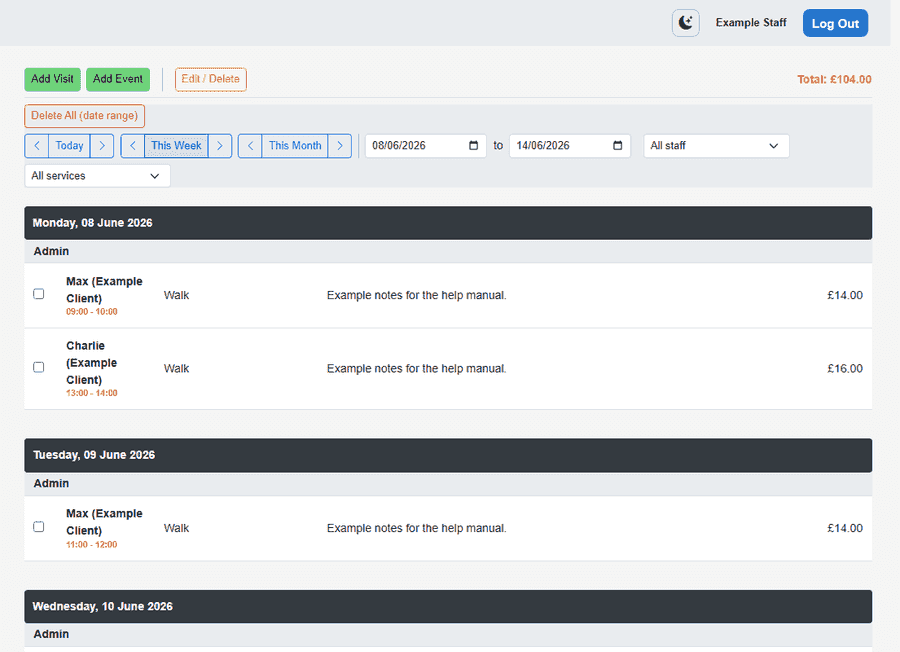
Visits, daycare, and boarding in one calendar

The scheduler is the hub of daily operations — see who is working where, adjust visits, and keep field staff in sync with the office. Run time-window visits, morning/afternoon daycare sessions, or multi-night boarding stays with run assignment and capacity checks — enable only what your business needs.

  • Day, week, and month calendar views
  • Daycare mode: Morning / Afternoon sessions (no per-visit clock times in staff UIs)
  • Boarding stays: runs, arrival–departure, in-house night rows, capacity checks
  • Staff and service filters with running totals
  • Cancellation policies: notice rules, staggered fee tiers, bulk cancel/restore
  • Bulk edit and repeat tools for regular clients
  • Excel import: Morning/afternoon visits or BoardingStays sheet
  • PDF diary export for printing or sharing with staff
  • Optional walk GPS proof and route maps on completed visits
  • Mobile schedule widgets with clear cancelled-visit styling
More about scheduling
Schedule grid with staff visits — sanitized example
Web schedule — week view with visit status

Clients & pets

Households, multi-pet profiles, and everything staff need before they leave

Pet care is household-based: one client record often covers several pets, multiple phone numbers, and access instructions that must not get lost between office and field.

  • One household record with multiple pets — names, breeds, vaccinations, and notes
  • Access keys, alarm codes, and emergency contacts on the client profile
  • Service areas, default staff, and per-client special pricing rules
  • Visit history and per-client scheduler views without cluttering the main calendar
  • Portal access toggles and intake invite links from the client screen
  • Excel template import: one row per household, slash-separated pets
More about clients & pets
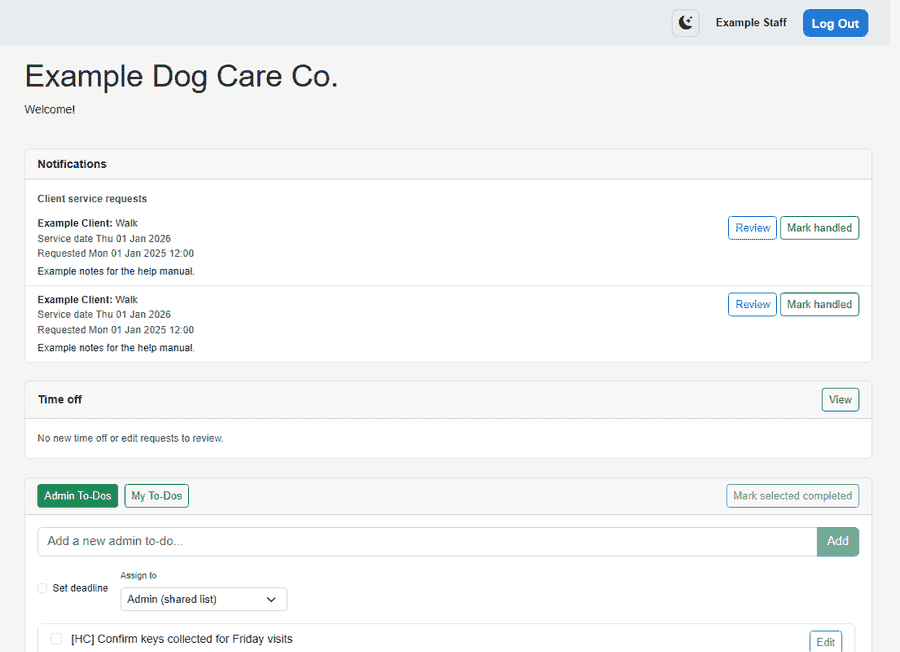
PetWalkly dashboard with daily operations — sanitized example
Client and visit context on your home dashboard

Client intake forms

Custom application forms, public links, and approve-as-client workflow

Stop copying “new client” details from email threads into your CRM. PetWalkly gives you a form builder, shareable links, and a review queue that ends in a proper client record.

  • Drag-and-order form builder with custom questions for your business
  • Public apply links — no login required for prospects
  • Per-form invite links you can send to one household at a time
  • Review queue: read, edit, reject, or approve as new client
  • Push alerts to admins when a form is submitted
  • Turn on client portal access during approval when you are ready
More about client intake forms
Requests card with new client applications — sanitized example
New applications land on your home Requests card

Operations dashboard

Requests, to-dos, dog field bookings, and today’s schedule in one place

The morning handover should not mean opening six tabs. PetWalkly’s home screen pulls the operational noise into one dashboard so admins know what needs action before the first van leaves.

  • Requests hub: intake, portal, and WhatsApp in one list
  • Admin to-dos with assignees, deadlines, and batch complete
  • Training summary to-dos open Design Studio from the visit workflow
  • Dog field booking groups with optional email ingest (IMAP)
  • Time off notifications for admins when staff submit leave
  • Today’s schedule snapshot without opening the full calendar
  • Real-time updates via SignalR when colleagues edit visits
More about operations dashboard
Web dashboard with schedule, requests, and tasks — sanitized example
Home — requests, to-dos, and today’s schedule

Dog field bookings

Secure field hire — booking groups and optional email ingest

Many UK walkers book private dog fields for safe off-lead exercise. PetWalkly groups those bookings on your home dashboard so they sit alongside visits and to-dos — not in a forgotten inbox folder.

  • Dog field booking groups on your home dashboard
  • Optional IMAP mailbox ingest for provider confirmation emails
  • One-click actions from booking groups without retyping details
  • Works with your company mailbox (Gmail OAuth or SMTP/IMAP)
  • Complements regular walk scheduling — same staff login and mobile apps
More about dog field bookings
Dog field bookings on PetWalkly home dashboard — sanitized example
Field bookings alongside requests and today’s schedule

Your brand & account

Your own subdomain, setup wizard, logo, mailbox, and data export

PetWalkly is multi-tenant SaaS built for pet care businesses — not a single shared login. Your company gets its own URL, database, and branding from day one.

  • Dedicated subdomain per company — `yourco.petwalkly.co.uk`
  • Setup wizard: scheduling mode, services, areas, branding, imports
  • Company logo on client portal, intake forms, and invoice PDFs
  • Company mailbox — Gmail OAuth or SMTP/IMAP for invoice delivery and booking ingest
  • Full Excel backup export from admin when you need a snapshot of your data
  • Marketing login page resolves your company code to the right subdomain
  • Need booking on your own domain? See custom install for enterprise options
More about your brand & account
Branded client portal with company logo — sanitized example
Your logo and colours on the client portal

Invoicing

Turn visits into invoices and get paid

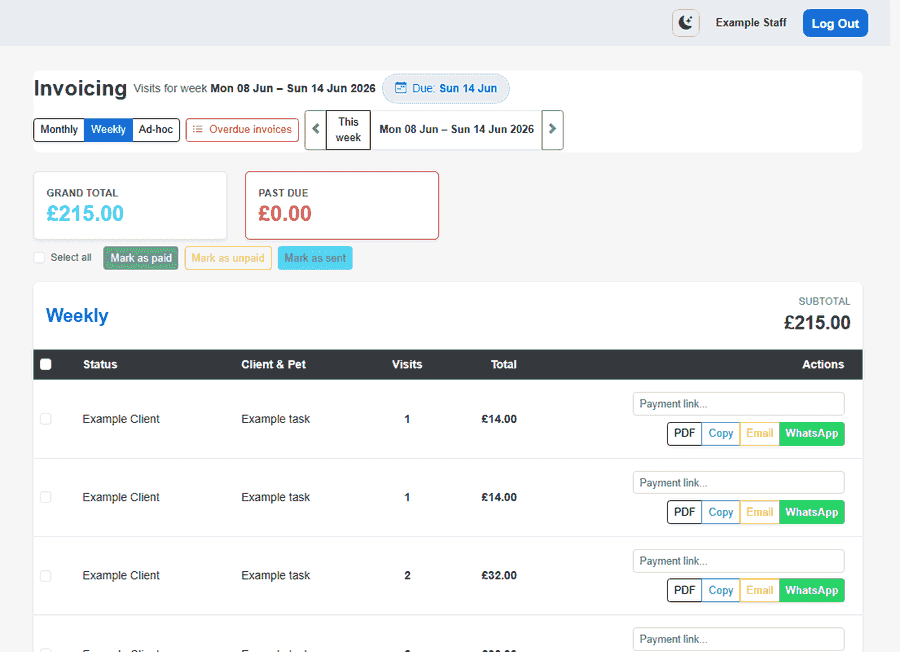
Turn completed visits into clear statements — monthly, weekly, or ad hoc — and track who has paid.

  • Monthly, weekly, ad-hoc, and overdue invoice views
  • Statements tied to scheduled visits and services
  • Email or WhatsApp as default invoice channel — customizable templates
  • PDF statements for web, portal, and attachments
  • Per-client pricing rules and billing timing
  • Sent and paid status tracking so you know what still needs chasing
  • Online payments via Stripe Connect and PayPal — see Payments & bank feeds
More about invoicing
Invoicing overview — sanitized example
Monthly and weekly billing on web

Payments & bank feeds

Stripe Connect, PayPal, Monzo links, and bank transaction import

Getting paid is more than sending a PDF. PetWalkly supports the payment rails UK pet businesses actually use — and can pull bank transactions into expenses so you are not typing every line by hand.

  • Stripe Connect Express — onboarding from admin, checkout in client portal
  • PayPal checkout when enabled on billing settings
  • Monzo payment links on invoices plus optional Monzo bank feed connection
  • Starling OAuth or personal access token — import transactions to expenses
  • Revolut Business API — connect from admin bank feeds
  • CSV bank statement import for other providers
More about payments & bank feeds
Invoicing and payment settings — sanitized example
Billing views and payment configuration

Client portal

Branded online access for households

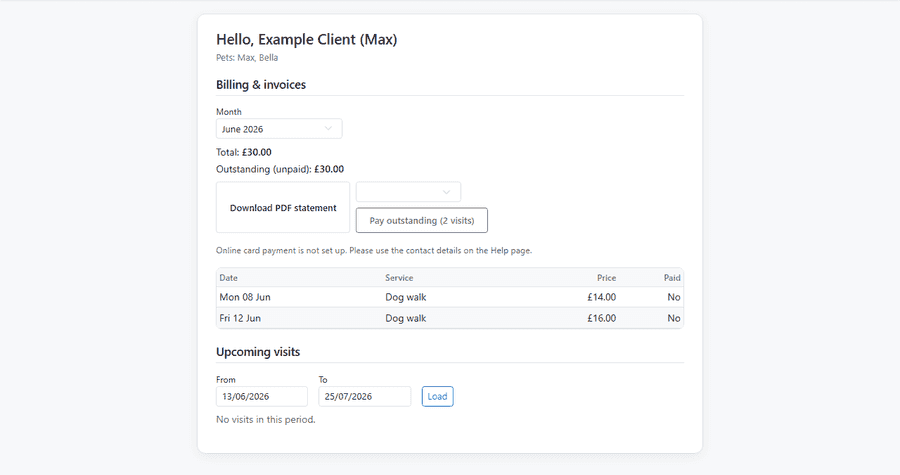
Clients log in on their phone or laptop to see upcoming visits, download statements, and request services — under your brand.

  • Branded login with your logo and colours on your company subdomain
  • Upcoming visits and monthly billing on one home screen
  • Published training summaries — PDFs staff create in Design Studio
  • PDF statements and Stripe / PayPal / bank transfer when enabled
  • Service requests — time windows, daycare sessions, or boarding dates
  • Pets and household details; clients update account settings
  • Schedule visibility: full times, windows only, or hidden until published
  • Per-client portal access toggled from staff web or mobile
More about client portal
Client portal home — sanitized example
Portal home — upcoming visits and balance

Design Studio

Training summaries and marketing designs — built in, no Canva subscription

Pet care businesses spend hours in Canva after every training session or when they need a social post. PetWalkly Design Studio keeps that work inside the same login as your schedule and client records.

  • Training summaries tied to visits and admin to-dos
  • Marketing designs for admins — social posts, flyers, and promos
  • Native iOS and Android canvas editor — pinch, zoom, resize, and export
  • Full web editor with graphics library (250+ SVG assets)
  • Text, shapes, photos, and branded graphics on a fixed canvas
  • Export PDF and PNG; publish summaries to the client portal
  • Optional email delivery when publishing a training summary
  • Prefill visit and pet details into summary templates
More about design studio
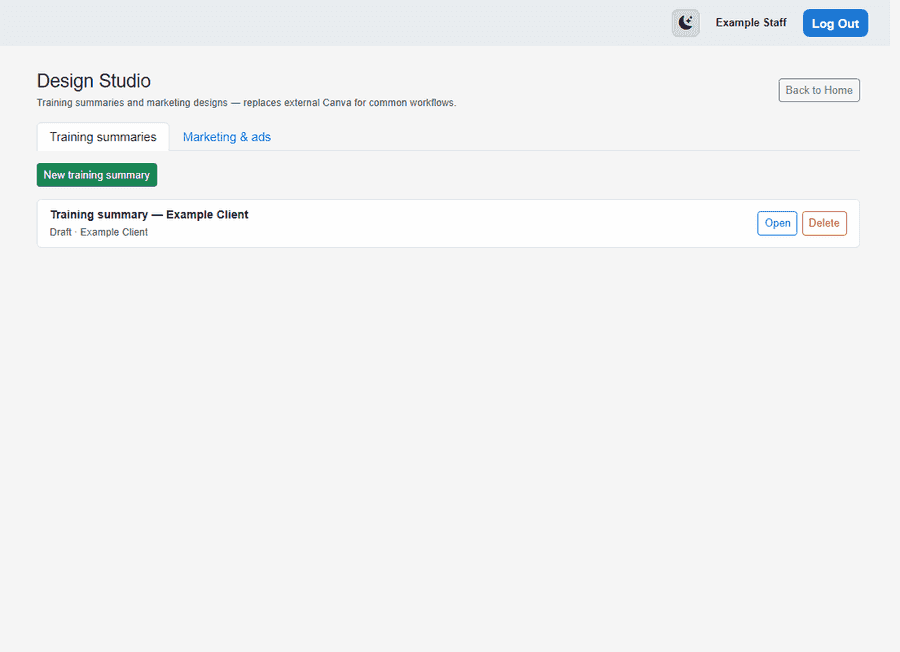
Design Studio hub with training summaries list — sanitized example
Design Studio — training summaries and marketing designs

WhatsApp & messaging

WhatsApp messages become service requests

Many pet care businesses run day-to-day coordination in WhatsApp. PetWalkly links those conversations to your existing service-request workflow — without copying messages into spreadsheets.

  • WhatsApp Business webhooks for inbound client messages
  • Direct chats match client phone numbers (UK formats supported)
  • Map group chats to households for group-thread workflows
  • Unknown numbers can create inbound contact alerts
  • Configure from web admin or mobile company settings
More about whatsapp & messaging
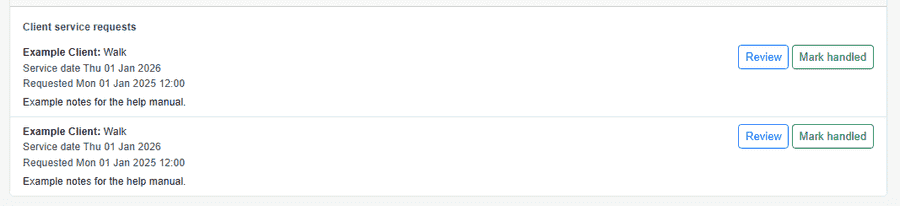
Service requests from WhatsApp on PetWalkly home — sanitized example
WhatsApp requests on your home dashboard

Walk GPS proof

Route evidence for completed walks — maps staff and owners can trust

Professional dog walkers are asked to prove visits happened. PetWalkly can record GPS proof when a visit is completed in the mobile app, then show the route on a map from the visit record.

  • Optional per-company — enable only if walk evidence matters to your brand
  • Captured when staff complete a visit in the PetWalkly mobile app
  • Open route maps from the visit on web or mobile
  • Stays linked to the same visit used for scheduling and invoicing
  • Complements PDF diary exports for paper-loving teams
More about walk gps proof
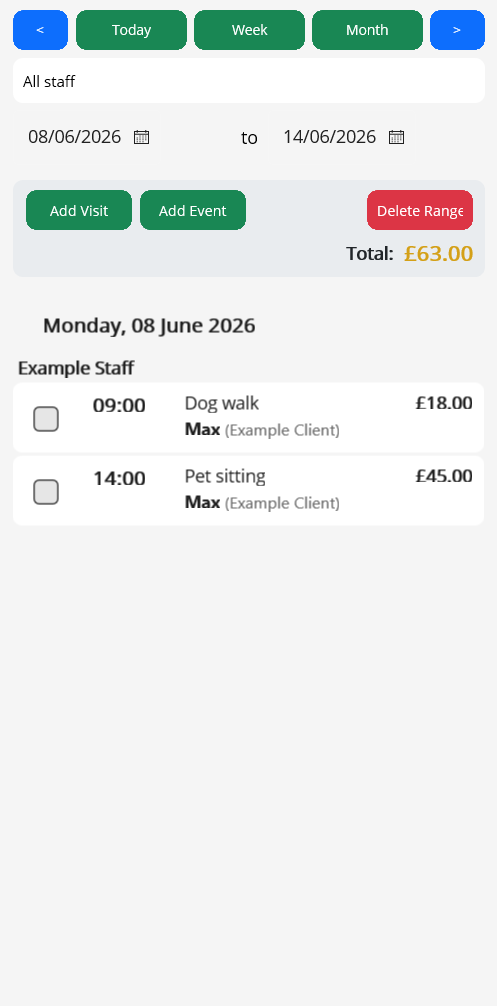
Mobile schedule with visit details — sanitized example
Complete visits in the field — proof captured when enabled

Expenses, mileage & reports

Receipt OCR, visit-based mileage, and financial reports — not just client billing

Client invoicing is only half the picture. PetWalkly includes back-office tools for the costs of running walks and sits — expenses, mileage, and period reports without exporting to a separate accounting spreadsheet.

  • Expense entry with receipt photo and OCR-assisted capture
  • Excel import and template for bulk expense loads
  • Mileage periods rebuilt from visit routes — business vehicle settings
  • Financial reports with date filters and client breakdowns
  • Excel export and print/PDF for accountants and year-end
  • Role-gated on mobile — admins see finance modules staff do not need
More about expenses, mileage & reports
Financial views in PetWalkly — sanitized example
Billing and business finance in one account

Staff pay report

Per-visit pay rules and export for walker payroll

Dog walking teams often pay walkers a cut of each visit, not a fixed salary. PetWalkly calculates staff pay from completed visits using rules you set once, then exports a report for your payroll run.

  • Company-wide toggle — enable only when you pay per visit
  • Default flat £ per visit or percentage of client price
  • Multi-staff visits: equal split or weighted by staff profile
  • Per-staff overrides on staff profiles when rates differ
  • Export staff pay report for a date range and staff filter
  • Schedule shows pay labels to staff; admins still see client prices in invoicing
More about staff pay report
Schedule with staff filters — sanitized example
Staff dimension on the schedule — pay export uses the same visit data

Team & time off

Staff permissions, leave requests, and scheduling that respects approved absence

Growing from solo to team means more than extra seats. PetWalkly separates what walkers can see from what office admins control, and makes leave visible before someone books a visit on top of a holiday.

  • Per-user permissions — staff only open modules their role allows
  • Master admin flag for company settings, intake, and billing
  • Staff request time off; admins approve, reject, or book on their behalf
  • Approved leave prevents scheduling conflicts on that person’s calendar
  • Push notifications to admins on new requests; staff notified when actioned
  • Deactivate or remove staff without losing historical visit records
More about team & time off
Team schedule with staff filters — sanitized example
Staff filters and capacity on the schedule

Mobile apps

Same schedule on iOS and Android

Staff install the PetWalkly app once, sign in with your company credentials, and carry the same schedule they see on the web.

  • Today's schedule and visit details at a glance
  • Daycare mode on mobile: Morning / Afternoon on the schedule and when adding visits
  • Cancel or restore visits from the field with the same fee rules as web
  • Optional walk GPS proof when completing visits in the field
  • Company settings from mobile admin (including daycare toggle and WhatsApp)
  • Client lookup, visit edits, and repeat tools on the go
  • Push notifications for schedule changes, intake, service requests, and time off
  • Design Studio on mobile — native editor for training summaries in the field
  • Home screen schedule widgets (iOS and Android) with cancelled visits highlighted
  • Admins: expenses, mileage, invoicing, and staff pay where roles allow
More about mobile apps
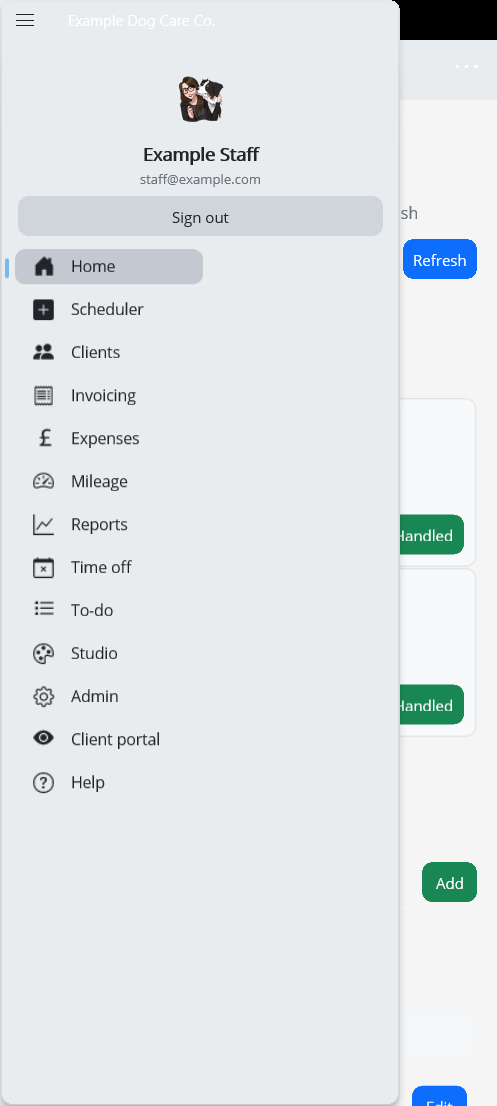
Mobile app navigation menu — sanitized example
Same modules as web — scheduler, clients, invoicing, and more

See it in action

The home page shows how web and mobile work together day to day.