
Client portal
Branded online access for households
Clients log in on their phone or laptop to see upcoming visits, download statements, and request services — under your brand.
You control what they can see and do: schedule visibility, service requests, and payment options are set in company settings.
Enable the portal per client from their profile when you are ready; new intake approvals can turn it on in the same flow.
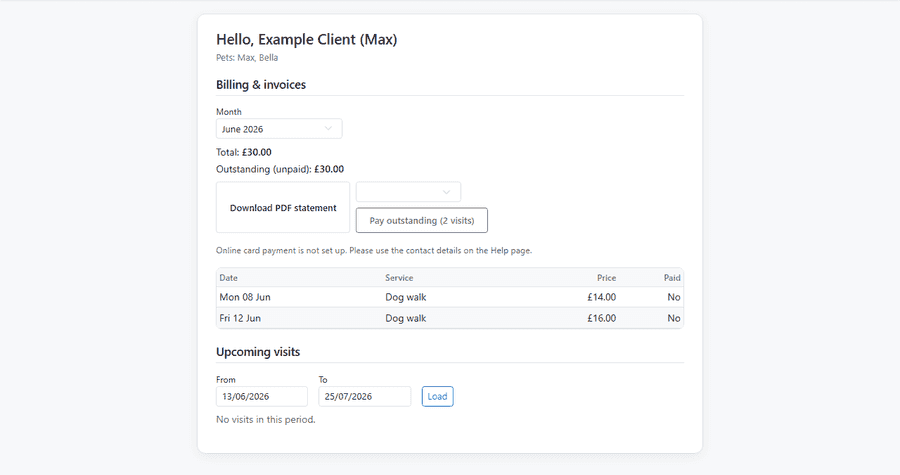
What clients see at home
One screen covers money and the schedule — no hunting through menus.
- Greeting and household name so the portal feels personal
- Billing section with month picker, line items, and outstanding total
- Download a PDF statement for the month they select
- Upcoming visits with dates, services, and published time windows
Booking and requests
- Request new services or changes when you allow it in company settings
- Daycare mode: clients choose Morning or Afternoon instead of a time window on service requests
- Boarding stays: clients choose arrival and departure dates for Stay-type services
- View pets and contact details tied to the household account
- Reset portal password flows without calling the office for every login issue
- Public apply links for new client intake when you publish a form
Pets and account settings
- Households see their pets and contact details tied to the account
- Clients reset portal passwords without calling the office every time
- Portal help content explains what they can and cannot do online
- Staff enable portal per client when the household is ready — not before
Payments and branding
- Turn on bank transfer, Stripe Connect, or PayPal from admin billing settings
- Clients choose a payment method and pay outstanding balance online
- Logo, colours, and company profile from your setup wizard carry through to the portal
- Schedule visibility defaults: show time windows, hide times, or other modes per company policy
Training summaries for owners
When your team publishes a visit summary, households see it on portal home — no extra login or email attachment hunt.
- Staff create summaries in Design Studio — web or native mobile editor
- Publish as PDF (and PNG preview) when the visit write-up is ready
- Clients open published summaries from the portal on phone or laptop
- Marketing designs stay admin-only — training summaries are the client-facing output
Explore more
- Your brand & account — Your own subdomain, setup wizard, logo, mailbox, and data export
- Design Studio — Training summaries and marketing designs — built in, no Canva subscription
- Client intake forms — Custom application forms, public links, and approve-as-client workflow
- Payments & bank feeds — Stripe Connect, PayPal, Monzo links, and bank transaction import
- WhatsApp & messaging — WhatsApp messages become service requests