Design Studio
Training summaries and marketing designs — built in, no Canva subscription
Pet care businesses spend hours in Canva after every training session or when they need a social post. PetWalkly Design Studio keeps that work inside the same login as your schedule and client records.
Training summaries link to visits and to-do items — open from a visit follow-up, design on web or phone, and publish a PDF owners can read on the client portal.
Marketing designs are for your team’s promotions — flyers, social graphics, and seasonal campaigns — with the same editor and a library of icons, badges, headers, and dividers built for pet businesses.
Training summaries owners actually read
After a training walk or behaviour session, owners want a clear write-up — not a screenshot of your notes app.
- Create a summary from a visit to-do or linked client visit
- Prefill fields pull visit date, pet name, and household context into the canvas
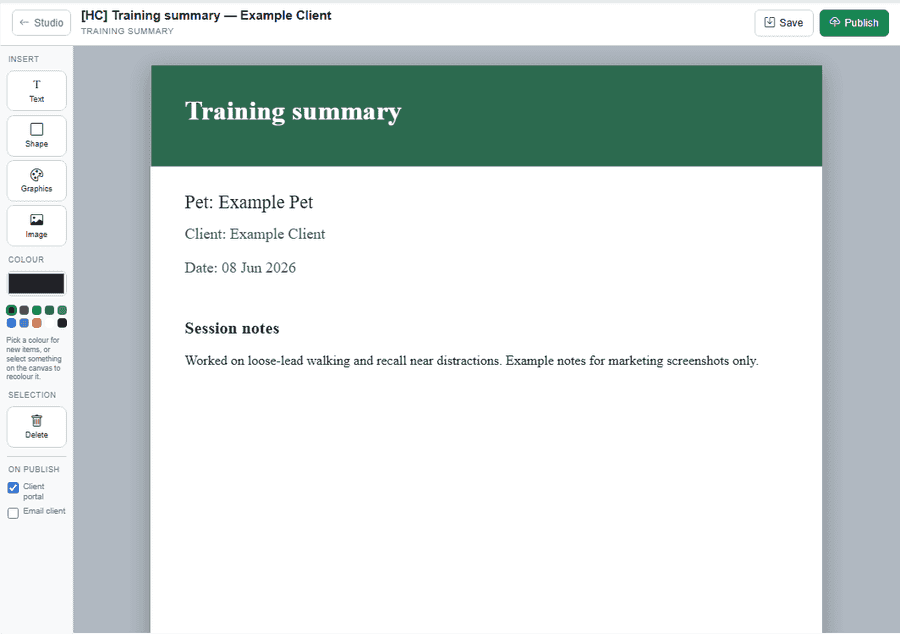
- Add your logo, session notes, tips, and graphics from the built-in library
- Publish PDF to the client portal when the summary is ready
- Households see published summaries on portal home alongside visits and billing
Marketing designs without leaving PetWalkly
Admins maintain a library of branded graphics for Instagram, email headers, and print — not scattered across personal Canva accounts.
- Separate Marketing tab — admin access only
- Reuse the same editor tools as training summaries
- Categories: icons, badges, headers, dividers, and frames for pet care
- Export PDF or PNG for social, email, or print
- Your company branding stays consistent across portal, invoices, and studio output
Web editor for the office
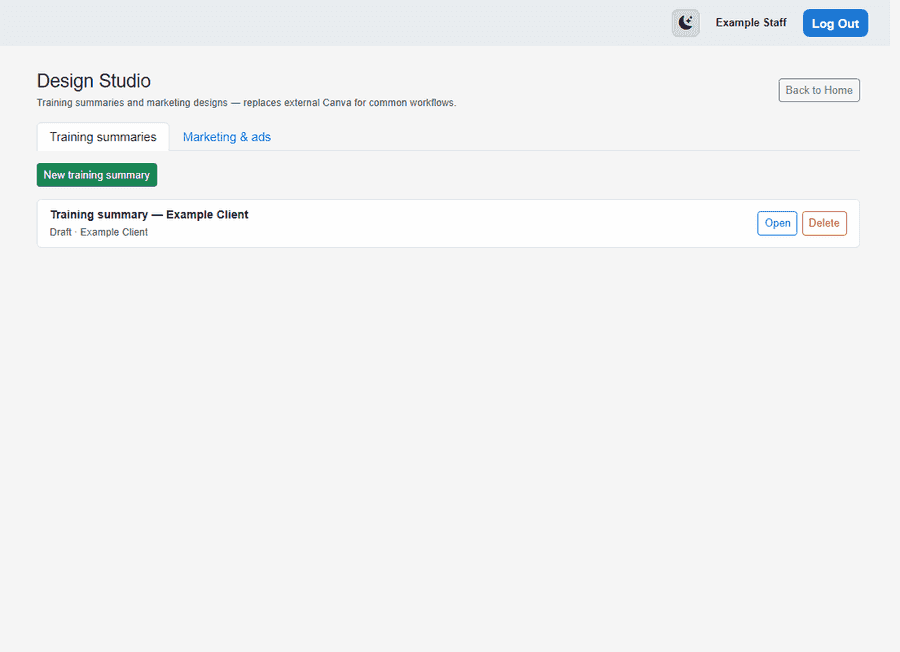
- Design Studio hub lists training and marketing documents with create, open, and delete
- Canvas tools: text, rectangles, images, and SVG graphics from the manifest library
- Category panel with thumbnails — browse icons, badges, headers, and dividers
- Save design JSON to the server — pick up on mobile or another browser later
- Publish workflow validates PDF and PNG before portal delivery
Native mobile editor for staff in the field
Finish a training visit, open the summary on your phone, and publish before you leave the driveway.
- SkiaSharp canvas — not a cramped web view inside the app
- Pinch to zoom, pan, move objects, and resize with on-canvas handles
- Same design format as web — documents sync through your PetWalkly account
- Graphics panel with categories and thumbnails loaded from your company site
- Export and share PDF from the device when owners want a copy immediately
Security and access
- Staff see only their own training documents unless they are admin
- Marketing documents are restricted to master admin and company admin roles
- Visit-linked summaries respect schedule permissions — staff on own-schedule-only see assigned visits
- Unauthenticated API access is blocked; portal clients see only published summaries for their household
Explore more
- Client portal — Branded online access for households
- Operations dashboard — Requests, to-dos, dog field bookings, and today’s schedule in one place
- Mobile apps — Same schedule on iOS and Android
- Your brand & account — Your own subdomain, setup wizard, logo, mailbox, and data export