WhatsApp & messaging
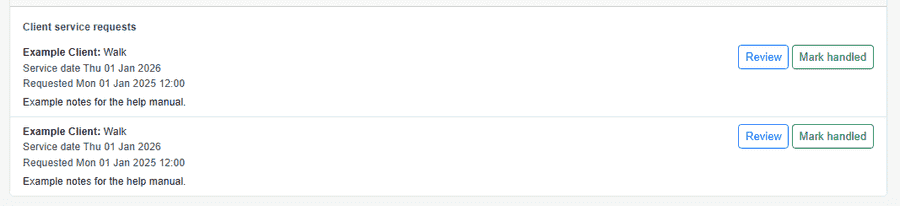
WhatsApp messages become service requests
Many pet care businesses run day-to-day coordination in WhatsApp. PetWalkly links those conversations to your existing service-request workflow — without copying messages into spreadsheets.
Use Meta WhatsApp Cloud API webhooks on your business account. Direct chats match clients by phone number; group chats can be mapped to households or auto-linked when the sender matches a client profile.
Unknown numbers can raise inbound contact alerts on your dashboard while you decide whether to onboard them.
Setup and webhooks
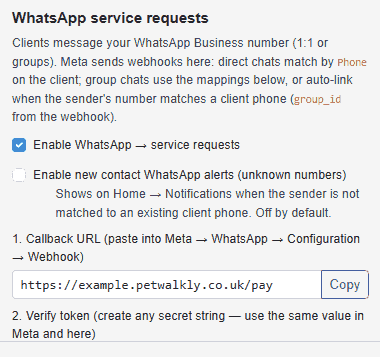
One-time configuration in company admin — then Meta delivers message events to PetWalkly.
- Copy the callback URL into Meta → WhatsApp → Configuration → Webhook
- Subscribe to the messages field on your WhatsApp Business account
- Enable WhatsApp → service requests when you are ready to ingest
- Optional alerts for new contact messages from numbers not on a client profile
Direct messages and groups
- 1:1 chats from known clients create portal service requests automatically
- Group chats need Meta group product access — map group_id to a household in admin
- Auto-link when the sender’s WhatsApp number matches client phone or emergency contact
- Request details include sender name and message text for your team to action
Mobile admin
- Master admins can review and change WhatsApp settings from the mobile app
- Same service-request list on home whether the source was portal or WhatsApp
- Works alongside email invoice delivery and contact-ingest mailbox settings
Explore more
- Scheduling — Visits, daycare, and boarding in one calendar
- Clients & pets — Households, multi-pet profiles, and everything staff need before they leave
- Client intake forms — Custom application forms, public links, and approve-as-client workflow
- Operations dashboard — Requests, to-dos, dog field bookings, and today’s schedule in one place