
Operations dashboard
Requests, to-dos, dog field bookings, and today’s schedule in one place
The morning handover should not mean opening six tabs. PetWalkly’s home screen pulls the operational noise into one dashboard so admins know what needs action before the first van leaves.
The Requests card combines new intake applications, client portal service requests, and WhatsApp-sourced requests — same workflow, different channels.
Optional dog field booking ingest watches a mailbox for confirmation emails and surfaces booking groups with one-click actions.
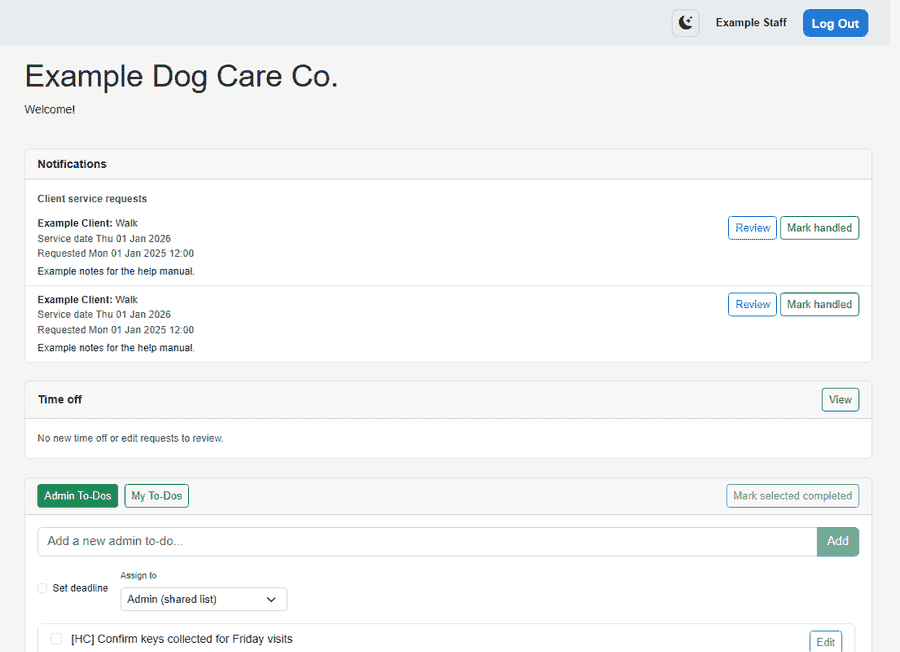
Requests from every channel
Clients reach you on the portal, WhatsApp, or your public intake form — you action them in one place.
- Portal service requests with session or date pickers when daycare or boarding is enabled
- WhatsApp direct and group chats mapped to households
- New intake submissions with applicant details and form answers
- Clear status so nothing sits in a personal inbox over the weekend
To-dos and follow-ups
- Create admin to-dos with assignee and due date — batch complete when a list is done
- Auto to-dos from visit workflows when your process needs follow-up
- My to-dos and company to-dos on home so nothing waits on a sticky note
- Open training summary design from a visit to-do — create branded PDFs for owners without Canva
- Dog field bookings surface here too — see the Dog field feature page for IMAP ingest detail
Real-time collaboration
Two admins editing the same week should not overwrite each other silently.
- SignalR keeps connected browsers in sync when visits move or cancel
- Schedule changes propagate to mobile without manual refresh
- Edit locks reduce clashes when multiple people adjust the same day
Stay ahead of the day
- Today’s schedule on home for a quick capacity check
- Time off requests highlighted for admins with approve/reject from admin screens
- Connected clients refresh when a colleague moves a visit — web and mobile stay aligned
- Jump straight into scheduler, clients, or invoicing from the main nav
Explore more
- Design Studio — Training summaries and marketing designs — built in, no Canva subscription
- Client intake forms — Custom application forms, public links, and approve-as-client workflow
- WhatsApp & messaging — WhatsApp messages become service requests
- Scheduling — Visits, daycare, and boarding in one calendar