
Invoicing
Turn visits into invoices and get paid
Turn completed visits into clear statements — monthly, weekly, or ad hoc — and track who has paid.
Billing rules live on each client profile, so mixed households (weekly dog walks plus monthly cat sits) stay organised.
Choose a default delivery channel — email or WhatsApp — and customize message templates so statements sound like your business.
For Stripe Connect, PayPal, Monzo links, and bank feeds, see Payments & bank feeds.
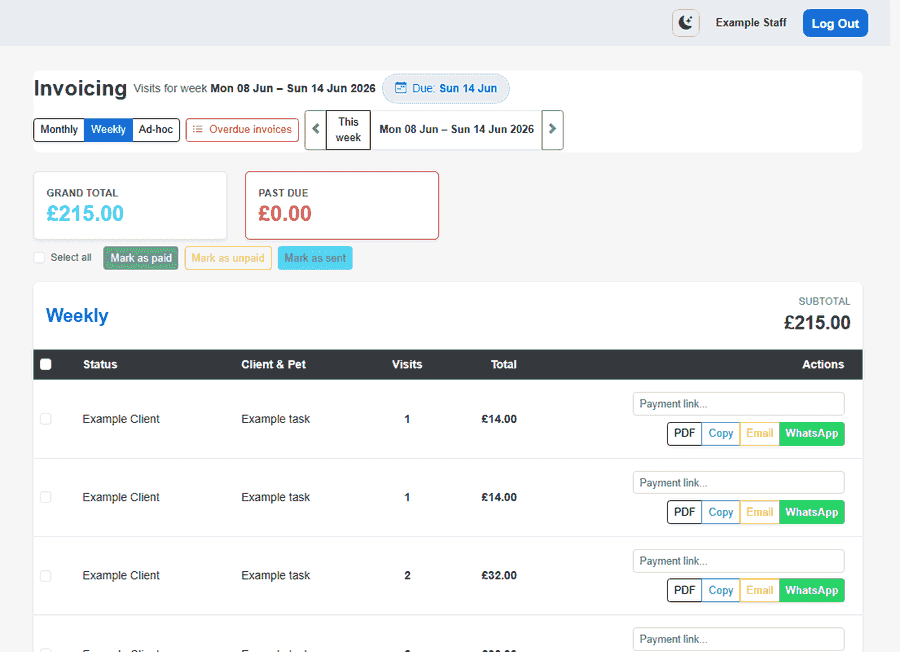
Flexible billing views
Switch the list to match how each client is billed.
- Monthly view for end-of-month clients with a statement per calendar month
- Weekly view with a date-range picker for clients billed every week
- Ad-hoc and overdue lists when you need to chase outstanding balances
- Status badges for sent, paid, not yet due, and overdue at a glance
From visits to invoices
- Visit lines pull through service names and prices automatically
- Special pricing rules on a client adjust charges without manual edits each time
- Choose whether a client is billed in advance or in arrears on their profile
- Summary totals follow the filter you have selected — check scope before bulk sends
Delivery and templates
- Set company default to email or WhatsApp in billing settings
- Customize invoice email subject, body, and WhatsApp message templates
- Send statements from the invoicing screen in one click
- PDF download for printing or attaching when email is not enough
Getting paid
Stripe Connect, PayPal, Monzo, and bank feeds are covered on the Payments & bank feeds page.
- Stripe Connect Express onboarding — recommended for client portal checkout
- PayPal checkout URLs when you prefer PayPal for some households
- Monzo payment links for quick pay-by-link workflows
- Bank transfer details in the portal — record manual payments when they arrive
Delivery tracking
Know which statements went out and which still need a nudge.
- Mark invoices sent when email or WhatsApp delivery completes
- PDF statements for download from web, portal, or attachment
- Overdue view highlights balances past your payment terms
- Clients see outstanding totals on the portal home when billing is enabled
Explore more
- Payments & bank feeds — Stripe Connect, PayPal, Monzo links, and bank transaction import
- Client portal — Branded online access for households
- Clients & pets — Households, multi-pet profiles, and everything staff need before they leave
- Your brand & account — Your own subdomain, setup wizard, logo, mailbox, and data export