
Scheduling
Visits, daycare, and boarding in one calendar
The scheduler is the hub of daily operations — see who is working where, adjust visits, and keep field staff in sync with the office. Run time-window visits, morning/afternoon daycare sessions, or multi-night boarding stays with run assignment and capacity checks — enable only what your business needs.
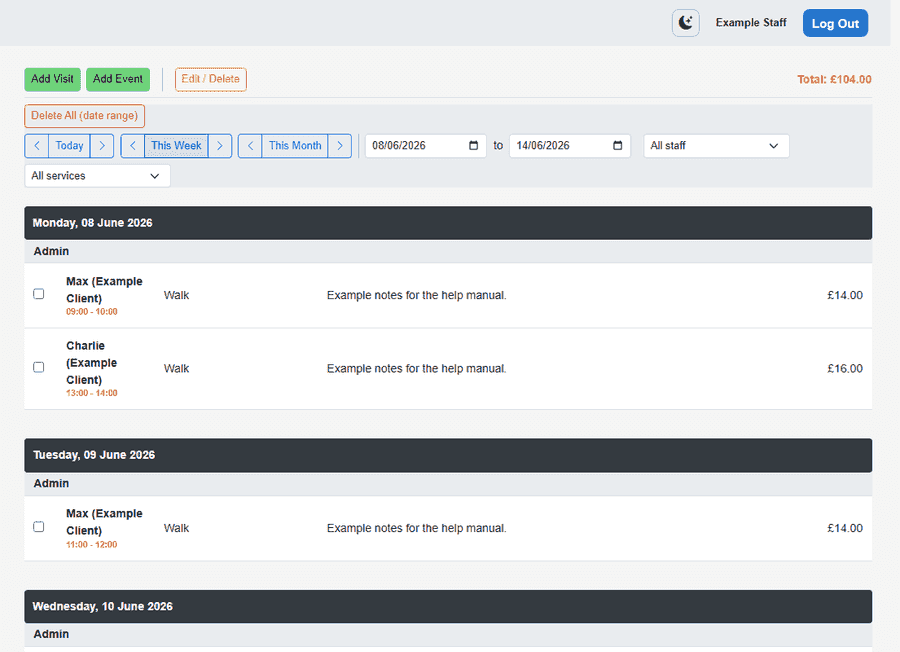
Filter by date range, staff member, or service type. Switch between day, week, and month views without losing your place.
Changes made on the web appear on staff phones, and updates from the field flow back to the dashboard.
Daycare businesses enable daycare scheduling in company settings or the setup wizard — staff assign pets to Morning or Afternoon instead of clock times. Kennels and catteries enable boarding stays to book arrival–departure ranges, assign runs, and show in-house guests on the schedule.
Plan your week
Start each day with a clear picture of capacity and revenue.
- Jump to today, this week, or this month, or pick a custom date range
- Filter by staff member or service to focus on one walker or route
- See visit counts and totals for the period you are viewing
- Group visits by day and staff so handovers are obvious at a glance
Visits and events
- Create visits with time windows, services, staff, and client notes
- Daycare mode: pick Morning or Afternoon and assign pets — events still use scheduled times when you need them
- Add one-off events separately from regular visit records
- Open a visit to change time or session, service mix, or assigned staff
- Use per-client scheduler views when you need one household’s calendar only
Daycare scheduling mode
Built for drop-off daycare, day boarding, and AM/PM session businesses — not just walk routes with clock times.
- Turn on in company admin or choose Standard vs Daycare during setup
- Schedule shows Morning and Afternoon labels instead of HH:mm for regular visits
- Client portal service requests use the same session picker when daycare mode is on
- Bulk edit, repeat visits, and mobile add/edit flows use session slots in daycare mode
- Visit import templates and exports use Morning / Afternoon in the time window column
Boarding stays (kennel & cattery)
Multi-night stays with pens and condos — separate from same-day daycare sessions.
- Define runs (dog kennel, cat condo, or mixed) and optional max concurrent boarders
- Add stays from the scheduler, client tab, or mobile; assign a free run or leave unassigned with company capacity checks
- Each occupied night appears on the day schedule as in-house with run name
- Edit or delete the stay from the boarding panel — not individual night rows
- Excel BoardingStays sheet: Arrival, Departure, Run, client, pets, and price
Bulk tools and imports
Bring an existing client list and schedule without typing everything again.
- Download Excel templates — one household per row, multiple pets with / separators
- Import .xlsx or .csv in the setup wizard or company admin (legacy 3-column files still work)
- In daycare mode, put Morning, Afternoon, AM, or PM in the visit time window column
- BoardingStays sheet for arrival–departure imports with run names
- Error workbooks highlight rows to fix before you re-upload
- Select multiple visits to edit, cancel, or delete in one pass
- Repeat patterns for regular walks after your base data is in
Visit cancellation policies
Last-minute changes are part of pet care — PetWalkly keeps fee rules consistent on web, mobile, and your invoices.
- Mark visits cancelled from web or mobile — cancelled rows stay visible with clear styling and widgets
- Future visits: automatic free cancellation when clients give enough notice (configurable hours)
- Short-notice and past visits: flat fee, percentage of visit price, or full charge
- Staggered tiers — e.g. 48h free, 24h partial fee, same-day full charge
- Staff see human-readable fee labels on the schedule when pay tracking is enabled
- Bulk cancel or restore many visits in one pass when weather or holidays shift the whole day
PDF diary and walk proof
Give staff a printable run sheet or evidence that a walk happened as planned.
- Export a PDF diary for a date range — handy for paper handovers or van folders
- Optional GPS walk proof: capture route data when a visit is completed in the field
- Open walk proof maps from the visit record when proof is enabled for your company
- Works alongside standard time-window visits and daycare session scheduling
Explore more
- Clients & pets — Households, multi-pet profiles, and everything staff need before they leave
- Walk GPS proof — Route evidence for completed walks — maps staff and owners can trust
- Design Studio — Training summaries and marketing designs — built in, no Canva subscription
- Team & time off — Staff permissions, leave requests, and scheduling that respects approved absence
- Dog field bookings — Secure field hire — booking groups and optional email ingest